App Canvas: From Safari Crashes to a Working iPhone Demo
TL;DR: from crashes to a usable iPhone canvas
iPhone Safari went from repeated reloads to a working canvas. All 77 authored UI states, real screens and interactions were preserved.
Before · iPhone Safari v0.6.1

Zoom. Reload. Crash.
Repeated zooming could end at Safari’s error screen.
After · physical iPhone 13 Pro
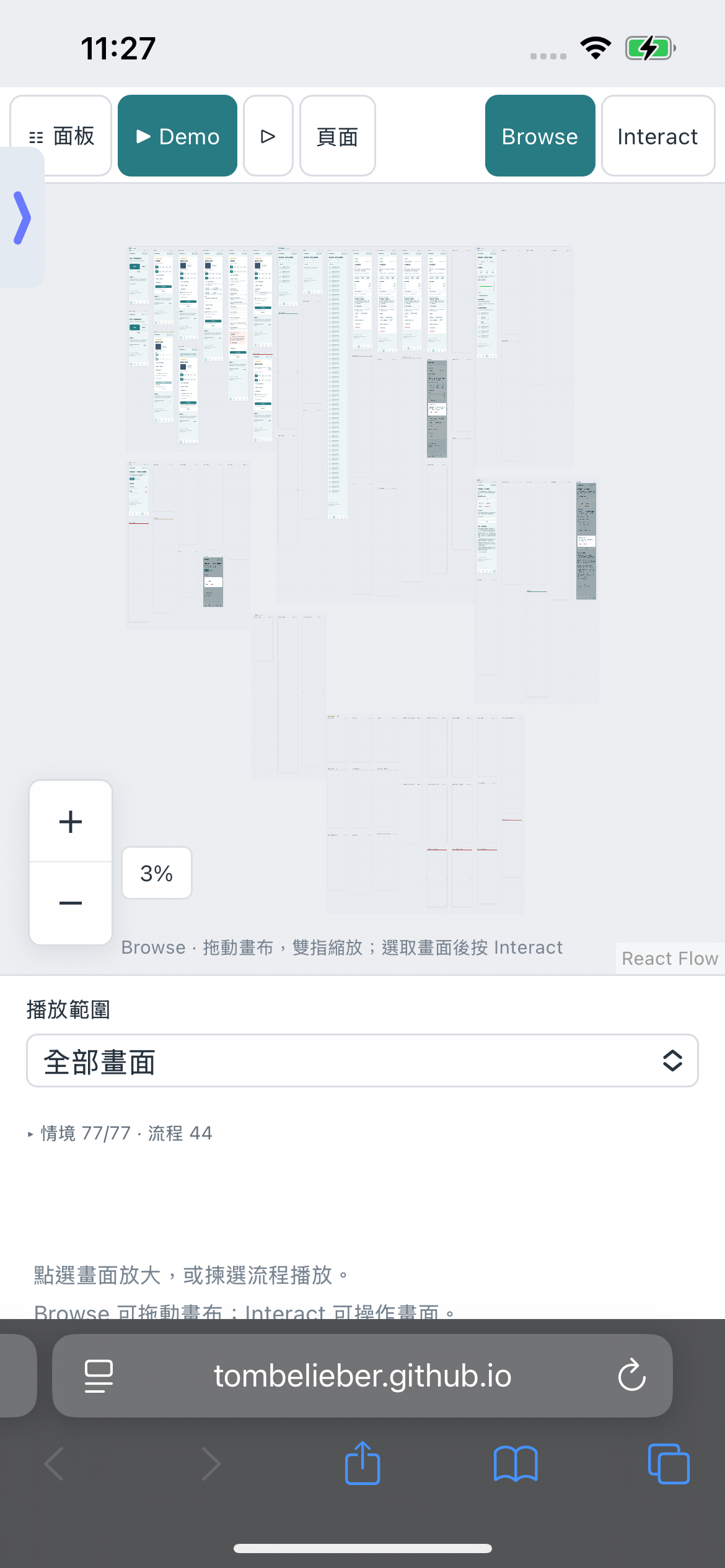
Load. Zoom. Interact.
The tested phone could run the full real-UI demo.
Memory: Mac and iPhone are different measurements
| Device | Early renderer | Shipped renderer |
|---|---|---|
| Mac Safari | ~2.2 GiB settled ~4.9 GiB sampled zoom peak | 635 MiB after return 1,912 MiB sampled peak |
| iPhone Safari | Repeated crashes Peak not captured | 1,703 MiB sampled peak footprint Median of three baseline trials |
These are WebContent process footprints, not JavaScript heap sizes. The Mac trials used different windows and zoom cadences; the iPhone recording came later. No matched memory-reduction percentage is claimed. There is no physical iPad performance result yet.
What made it possible
- Bound the rendering surface. Move the shared preview plane outside the scaled graph, keep it viewport-sized and follow the graph’s actual camera.
- Separate previews from running apps. Share 74 source HTML/CSS previews in one context, retain three isolated native-dialog documents and cap DOM-compatible running apps at four on touch devices.
- Defer costly backdrop effects. Pause blur on moving or tiny passive previews; restore larger idle previews after 150 ms. Original running apps keep their effects.
The result was crash-to-working usability. A later FPS-tuning candidate did not improve the overall device result and was not shipped. Read the implementation or inspect the later iPhone benchmark.
I wanted to see every screen and meaningful state of an application on one zoomable canvas, then click into the real UI or play a flow. The result is App Canvas, an open-source development tool designed to work with a coding agent.
On an early version, repeated zooming on iPhone Safari reloaded the page. Eventually Safari displayed its repeated-problem error screen. The canvas could not serve its basic purpose on the phone.
After iterating on how the browser rendered the overview, the same full-UI demo became usable on a physical iPhone: it could load, zoom and be operated while retaining the application screens and interactions. Getting from repeated crashes to a working phone demo was the main result.
The investigation showed why that took more than reducing React work. The application also had a browser rendering budget, and a small final element rectangle did not guarantee a small intermediate compositing cost.
There are two stages to this story. The rendering changes made the demo usable on the phone. A later A/B experiment tried to improve that already-working renderer and was rejected. That follow-up does not measure the earlier crash-to-working improvement.
What changed for the person using it
| Stage | Observed outcome |
|---|---|
| Early iPhone Safari reports | Repeated zooming caused reloads and eventually Safari’s repeated-problem screen. |
| After the rendering iterations | The physical iPhone demo could be loaded, zoomed and operated with its real UI preserved. |
| Later physical stress test | All six measured motion windows completed without reloads or recorded errors; three used the shipped renderer and three a further candidate. |
Those observations establish a useful, bounded outcome. They do not guarantee crash freedom on every iPhone or during an arbitrarily long session.
The requirement I wanted to preserve
The public StoolSense example contains 77 authored UI states. It includes forms, empty lists, pending saves, error recovery, dialogs, imports and exports, with synthetic data throughout.
The requirement was to keep those complete screens visible. Replacing them with labels or screenshot thumbnails would have changed the product.
The overview therefore uses source-rendered HTML and CSS. Compatible screens share an opaque-origin iframe, with a separate shadow tree for each document. Selecting a screen loads its original application HTML/CSS/JavaScript; Interact enables its controls. Playback uses one continuing application session so earlier actions actually affect later steps.
For this fixture, that means 74 source DOM previews in one shared context, plus three isolated native-dialog documents. It does not mean 77 applications executing simultaneously. DOM-compatible live application frames have a separate budget: four on touch devices and eight on desktop, including playback.
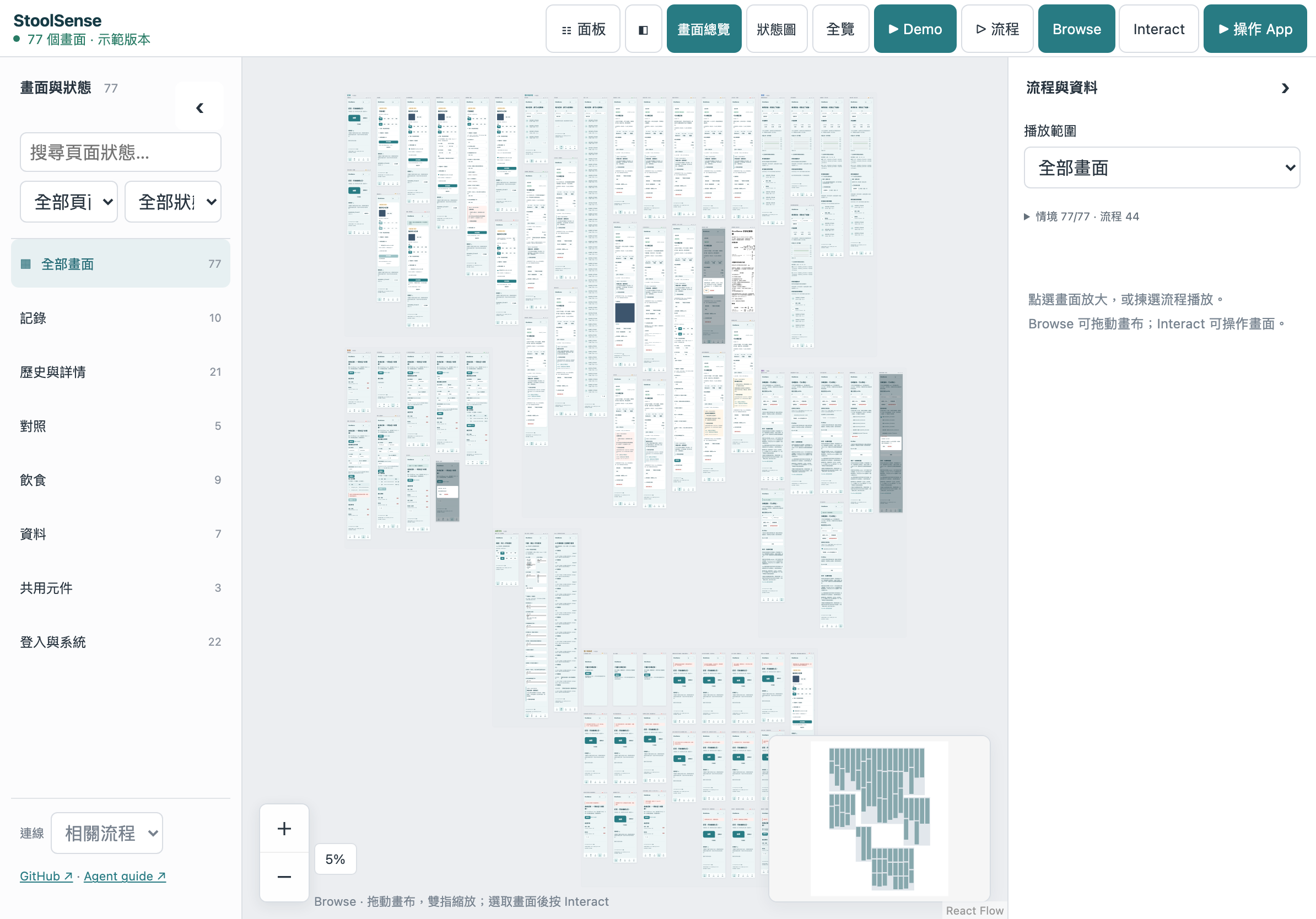
A screenshot of the tool. The screens inside the running overview are rendered HTML/CSS, not this image.
Fewer iframes did not eliminate the graphics problem
Reducing browsing contexts was useful, but the shared renderer could still create expensive graphics work during zoom.
In the earlier implementation, the shared iframe lived inside React Flow’s transformed graph through a viewport portal. An inverse transform tried to cancel the graph camera so the iframe’s final rectangle remained the size of the visible canvas.
That final rectangle looked reassuring. It was not a reliable bound on intermediate browser surfaces.
WebKit’s Layers documentation describes the relevant tradeoff: compositing layers can avoid repainting work, but their memory cost can be severe on constrained devices. In this application, desktop Safari experiments showed multi-GiB process footprints during zoom even after the overview had been consolidated into a shared context.
That is evidence of excessive rendering cost. It is not a complete allocation-level explanation for every iOS reload. I do not have a fully resolved account of the remaining native-memory accumulation.
What shipped: change where the surface lives
The rendering fix in PR #2 moved the shared preview plane outside the graph transform. The plane remains the size of the canvas viewport; its internal world follows the same camera as the graph.
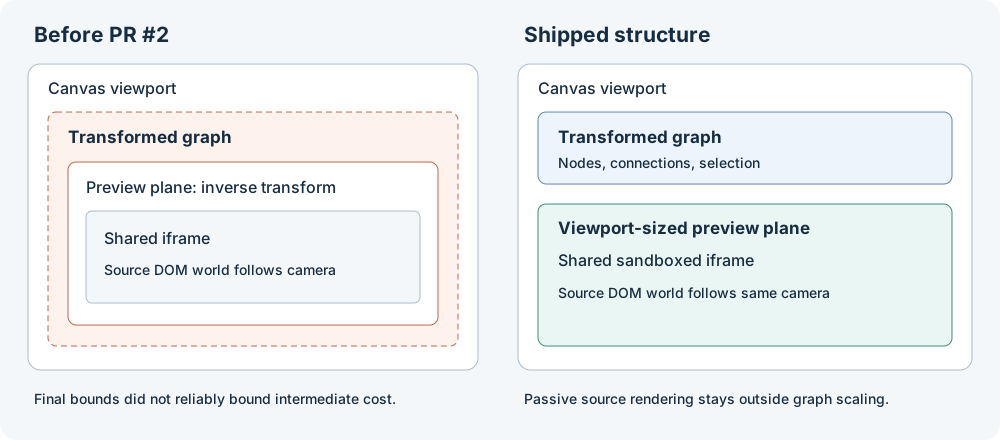
The simplified structure is:
Canvas viewport
├── Transformed graph: nodes, connections, selection surfaces
└── Viewport-sized preview plane
    └── Sandboxed iframe
        └── Source DOM world following the graph camera
The graph still owns navigation and selection. The preview plane owns passive source rendering. Keeping them aligned requires the actual current camera, including touch-driven internal transforms, rather than a stale callback snapshot.
Layer order also matters. Group backgrounds must stay behind source pixels, and the passive copy of a screen must disappear while its original running application is presented. A memory fix that tints the UI or covers playback is a regression.
What shipped: reduce expensive effects without changing layout
The source UI included backdrop effects. Repeating those across many transformed previews created another cost to investigate.
The shipped policy defers backdrop filters while the camera moves and when a preview is narrower than 120 canvas CSS pixels. Larger stationary previews restore the effects after 150 ms. Original running applications retain their effects.
This is a deliberate quality policy. Text, controls, layout and images remain; small or moving passive previews temporarily lose their backdrop blur. It is not pixel-identical rendering of every effect at every instant.
I also tried CSS zoom. Some desktop readings looked much better, but text wrapping and native form geometry changed. Those differences violated the source-UI requirement, so I rejected that approach.
How large was the early footprint?
The desktop experiment report records an early Mac Safari renderer at about 2.2 GiB settled, with a zoom trial sampling roughly 4.9 GiB. The selected final landscape trial sampled a 1,912 MiB peak and about 635 MiB after returning to the overview, including loading and 20 maximum-zoom cycles.
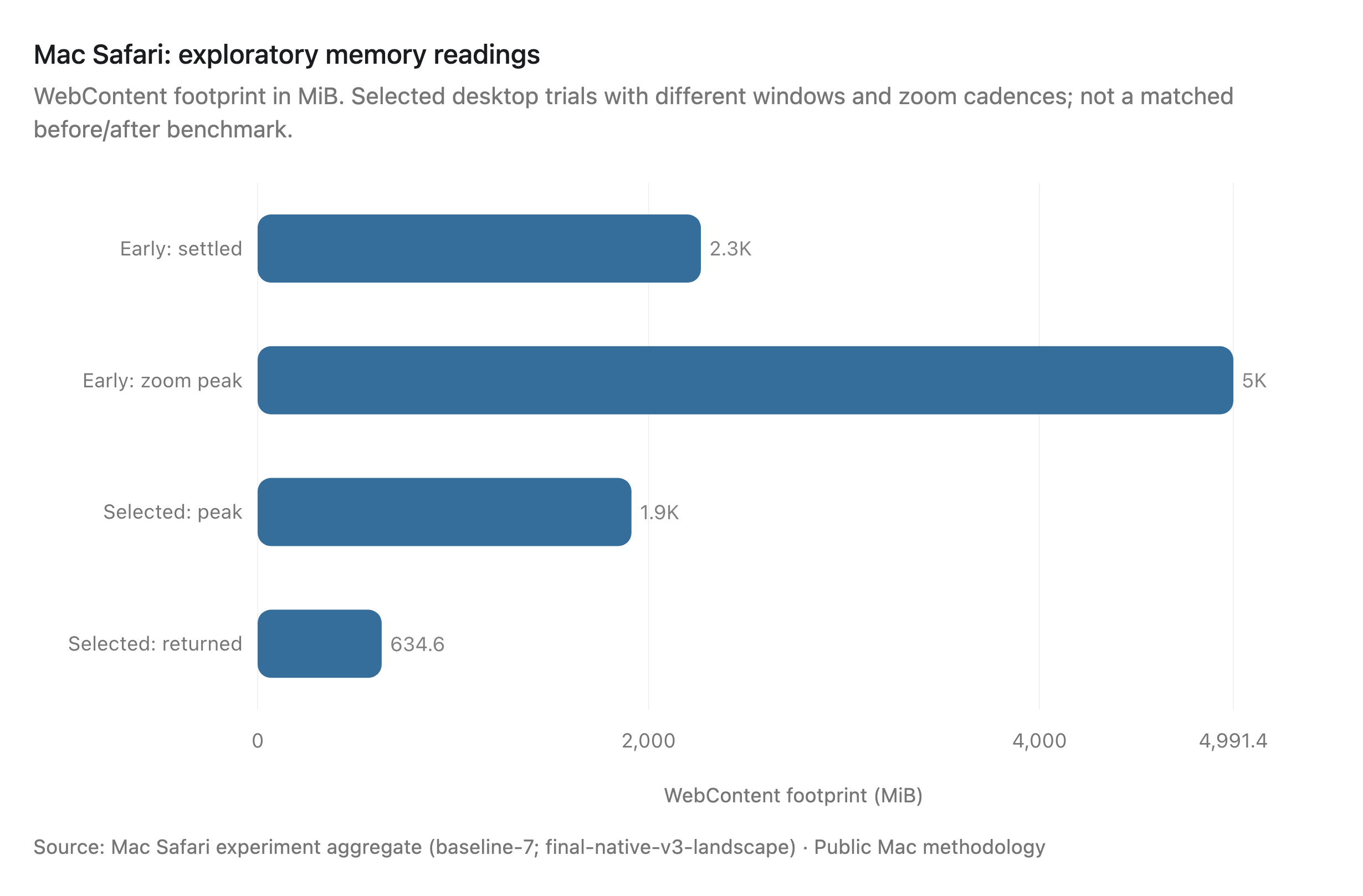
These numbers help explain why graphics pressure became the focus. They are desktop measurements, not the old iPhone’s pre-crash memory usage. The trials also used different window sizes and zoom cadences, so they do not establish a matched percentage reduction. I do not have a reliable peak-memory measurement from the original crashing iPhone version.
The phone outcome and the desktop allocation experiments support different parts of the story: the demo became usable on the tested phone, while the Mac experiments guided the rendering changes. An iPhone memory-reduction percentage would require a matched recording of the original crashing version.
Fidelity needed its own regression checks
Performance checks alone could have rewarded a renderer that silently changed the UI.
The shipped checks compare source text wrapping and form geometry across zoom levels in Chromium and WebKit. The full fixture comparison covers 5,522 text/form elements across 74 shared documents at five zoom levels. It found no changed line counts in the selected transform-based renderer, with a maximum observed onscreen geometry difference of approximately 0.03 CSS pixels at 500% zoom.
Separate checks exercise source colors, preview-to-selection alignment, unobscured playback, and repeated touch-event zooming. The zoom gate uses 20 cycles and 480 intermediate samples, checking context lifetime and source reloads as well as the return to the complete overview.
These are useful browser regressions. Playwright WebKit is not a physical iPhone, and those synthetic gestures are not trusted native multitouch input.
A later benchmark tested the already-working renderer
Once the phone could run the demo and the rendering fix had shipped, I tested a further candidate that reduced repeated renderer writes, stabilized preview membership and narrowed viewport subscriptions. A deterministic check reduced 30 unnecessary workbench-consumer renders during 30 camera updates to zero.
That looked promising locally. The device-level result did not justify shipping it.
The physical test used an iPhone 13 Pro running iOS 18.6.2, with byte-identical source documents for all 77 cases. The order was A–B–B–A–A–B, giving three trials per variant. Each trial ran three zoom/pan cycles, with four 1,500 ms phases per cycle, through the actual gesture handler. Maximum zoom was 500%.
The baseline was already after PR #2, at version 0.10.2. This was an incremental experiment, not a comparison against the old crashing renderer.
| Metric | Shipped baseline | Rejected candidate |
|---|---|---|
| Native display FPS | 49.06 | 49.75 |
| rAF callback cadence, FPS | 49.47 | 49.66 |
| rAF interval p99, ms | 130 | 146 |
| Sampled WebContent peak footprint, MiB | 1,703 | 1,971 |
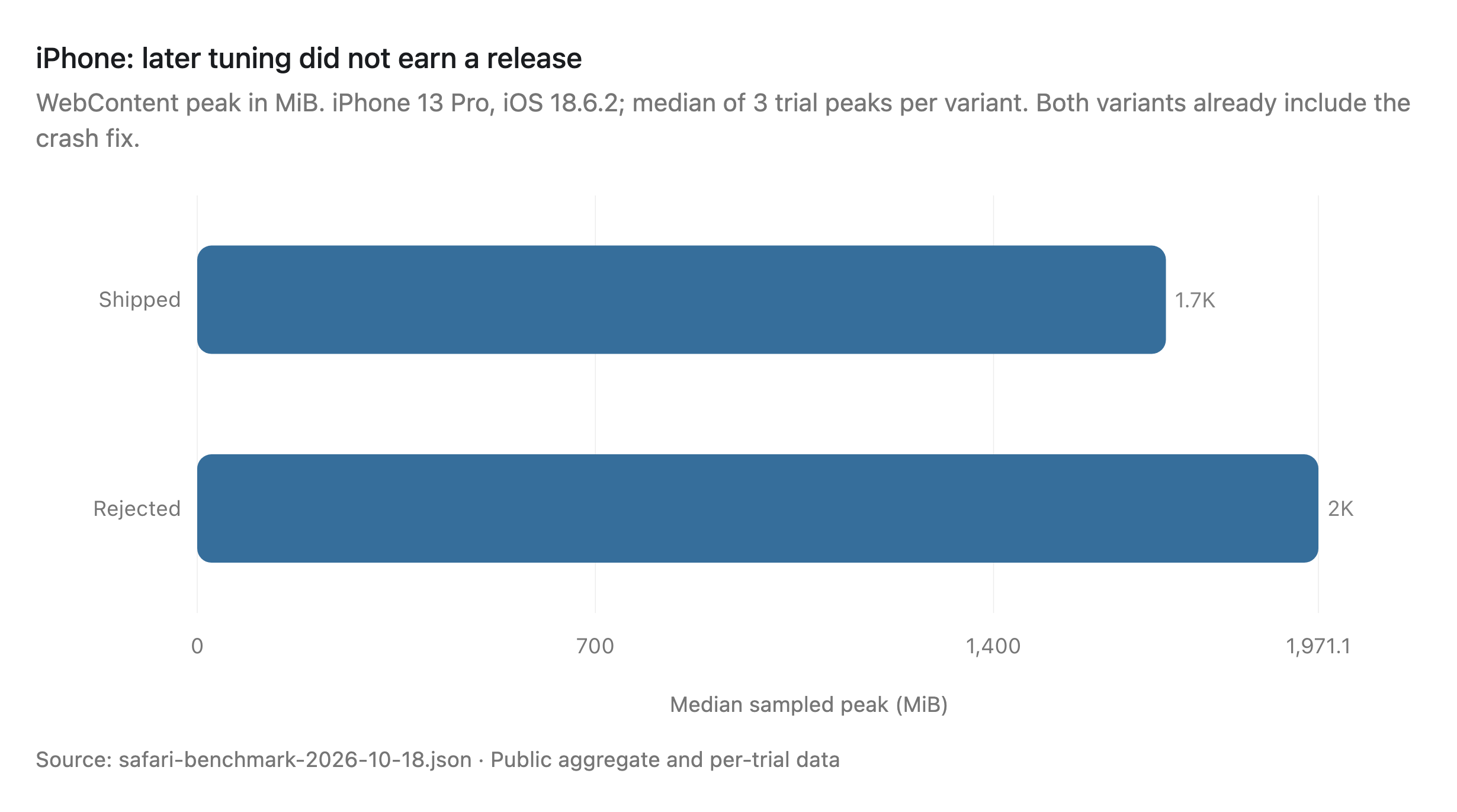
Each value is the median of three per-trial results. The public benchmark report includes ranges, and the aggregate JSON contains the individual trials.
The small FPS difference came with worse p99 cadence and higher sampled peak footprint. With only three repetitions, I would not treat the FPS change as a reliable improvement. The candidate stayed unmerged.
The memory metric needs care. It is the sampled physical footprint of the WebContent process dominating CPU during the workload, including caches and graphics charged to that process. It is not an exact per-page JavaScript heap total. GPU-process memory was not added again. Memory was sampled every 500 ms, so shorter peaks could be missed.
Native FPS came from whole-display Core Animation samples, not a panel scanout trace or a direct measure of pinch latency. The rAF numbers are reported separately. The existing Safari profile and extensions remained enabled; thermal state and power mode were not recorded. These are descriptive results from one phone, not a device-matrix qualification.
All six primary motion windows completed without reloads or recorded errors. Additional same-page replay and clipping experiments did not demonstrate a repeatable memory win. A smaller follow-up failed clean-run admission after an unclassified JavaScript error during navigation away from a baseline trial. It was not released either.
Why I did not switch to a Figma-style GPU renderer
Figma’s WebGPU renderer account describes a custom C++/Wasm rendering engine, resource reuse and batched GPU work. Its own migration required careful handling of regressions. Changing the graphics API alone was not the optimization.
App Canvas has a different constraint: preserve an existing application’s browser UI and run its actual controls. Rebuilding arbitrary HTML, CSS, native form behavior and application semantics inside a custom drawing engine would be another substantial product.
Figma’s incremental frame loading is a more directly useful reference. It loads nearby prototype frames and evicts unnecessary ones on mobile. App Canvas similarly separates the complete overview from a bounded set of running applications. But showing every visible overview screen still has a rendering cost; making playback incremental does not remove it.
Where this leaves the tool
The shipped result is a real-UI canvas that became usable on the tested iPhone after earlier versions repeatedly reloaded. It retains the full screens and original interactions. That is the practical improvement this work set out to achieve.
The later React optimization bundle was rejected; the already-working renderer remains published. There is no measured basis for calling this state-of-the-art performance, and there is no physical iPad performance result yet.
The next useful investigation is the remaining WebContent footprint across repeated, controlled runs—not another render-count victory presented as a native-memory fix. Long-session accumulation remains unresolved. A later public-page verification also encountered one preview-readiness timeout that did not reproduce in subsequent diagnostic and Chromium/WebKit runs; its origin was not established.
The useful lesson is specific: keep the real UI and interactions intact, change the rendering architecture until the target device can use the product, then measure further tuning against that working baseline. A rejected follow-up is worth documenting, but the main milestone was getting the canvas working on the phone.
Try the live canvas · Read the product introduction · Inspect the source and measurements